Splice
Point at a NETCONF device's IP, get a working gNMI server.
Vendor-agnostic telemetry for optical and network gear that never spoke gRPC.
Modern telemetry collectors — gnmic, Telegraf, OpenConfig pipelines — expect gNMI over gRPC. But a huge amount of deployed optical and transport gear only speaks NETCONF: ROADMs, transponders, amplifiers, line systems. Each vendor ships its own YANG models, its own list keys, its own quirks.
Splice fixes that. Give it an IP and credentials; it discovers the device's YANG models, builds a telemetry catalog, polls NETCONF under the hood, and serves standard gNMI to any client — no per-vendor code, no changes to the device.

Three different vendors — Lumentum ROADM, Adtran Teraflex, Juniper ILA — streaming optical power into one Grafana dashboard through Splice.
No hardware? No problem.
Everything below works against a built-in simulated device. Run splice --simulate openroadm run and point any gNMI client at localhost:9339. See Simulation.
How It Works
graph LR
    D["NETCONF device<br/>:830 (SSH)"] -->|YANG discovery| C[Catalog]
    C --> P[Poller]
    P -->|NETCONF get| D
    P --> M[(TTL cache)]
    M --> G["gNMI server<br/>:9339 (gRPC)"]
    G -->|gNMI Get / Subscribe| K["gnmic · Telegraf<br/>AI agents"]
    DB[(PostgreSQL)] -.-> C
Discovery walks the device's YANG library into module-qualified catalog paths, the planner batches them into efficient NETCONF reads, and a resilient poller fills a TTL cache that the gRPC server answers from. Performance-monitoring data is published under synthetic, instance-keyed paths so per-port metrics never collide.
For the full picture — the three usage stacks, the layered design, and the data flow — see the Architecture overview.
Key Features
| Feature | Description | |
|---|---|---|
| 🧭 | Zero-touch onboarding | quickstart --host <ip> discovers YANG, builds the catalog, and serves gNMI in one command |
| 🏷️ | Vendor-agnostic | Works across any NETCONF/YANG device — proven live on Lumentum, Adtran, and Juniper gear |
| 🔑 | Instance-keyed telemetry | PM data carries its originating port as gNMI keys, so multi-line metrics stay distinct |
| 🔁 | Drift self-healing | Re-resolves list instances at startup and rebuilds filters when a device is re-provisioned |
| 🩺 | Lockout-safe resilience | Reconnect-once, circuit breaker, and auth/session-limit detection protect fragile devices |
| 🎯 | Curated polling | Poll only the metrics you care about with include patterns and per-pattern intervals |
| 📊 | Grafana dashboards out of the box | Setup generates per-device live-telemetry and YANG-inventory dashboards from the catalog |
| 🔎 | Hybrid path search | Find paths in huge YANG catalogs by keyword (BM25) blended with semantic embeddings |
| 🧪 | Hardware-free simulation | --simulate openroadm runs the full pipeline against a simulated device |
| 🤖 | AI-agent ready | Built-in MCP server exposes the bridge as tools for Claude and other agents |
Resilience is the load-bearing design choice
Optical devices frequently limit concurrent NETCONF sessions and lock accounts on repeated auth failures, so every RPC path is built to back off rather than hammer. See Observability & Resilience.
Four Ways to Use It
| Interface | Entry point | Best for |
|---|---|---|
| CLI + PostgreSQL | splice --config <cfg> setup \| run |
Production: persistent catalog, multi-device, history |
| Python API | Device("sim://openroadm") |
Scripting and notebooks — no database or config files |
| MCP server | splice mcp |
AI agents — connect, query, and set config as tools |
| Interactive TUI | splice-tui --devices-dir devices |
Operators — browse paths, watch live telemetry, run setup |
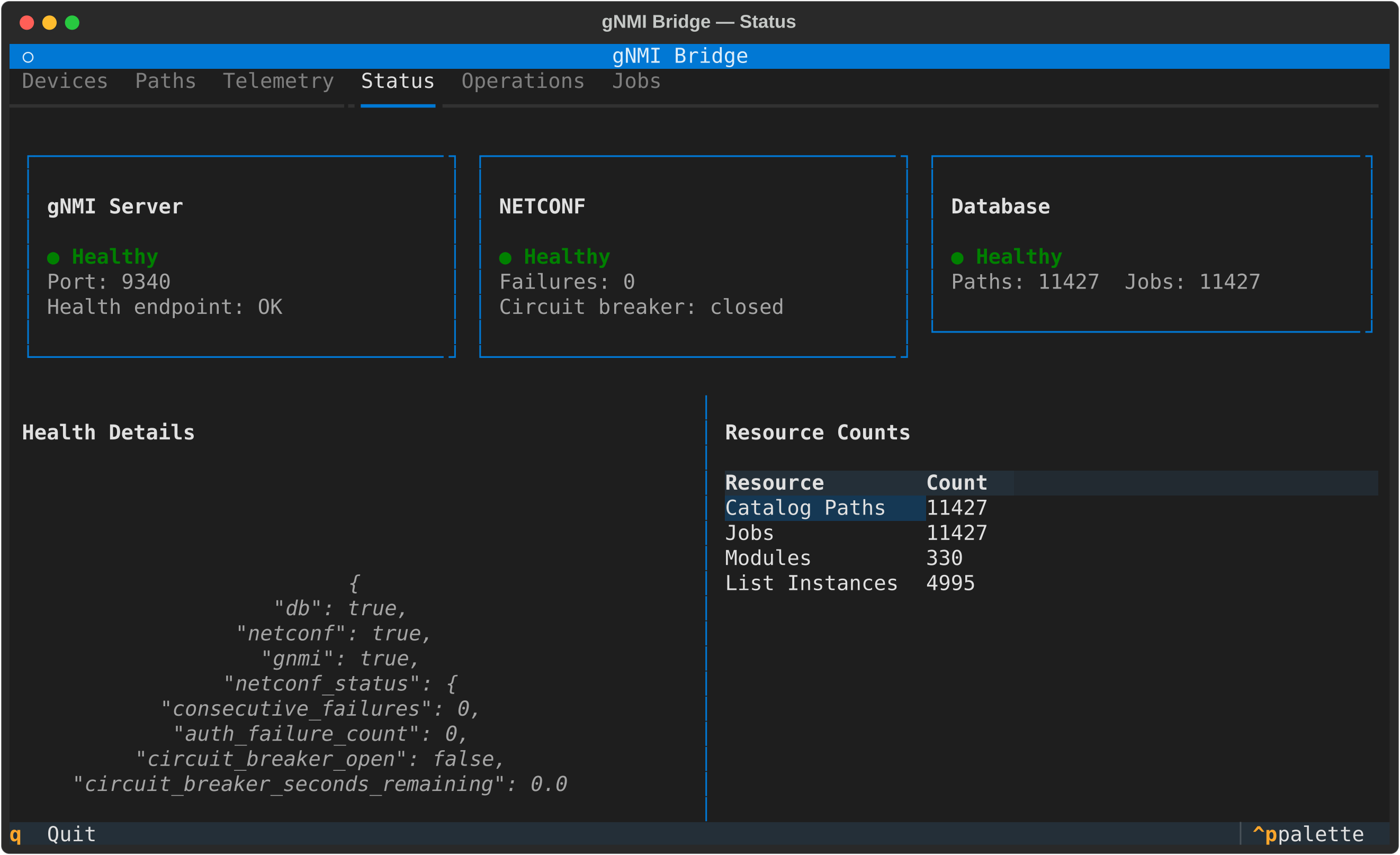
The Textual console managing a live Adtran Teraflex — health cards, circuit-breaker state, and catalog counts at a glance.
Get Started
The fastest path is two steps: Installation then Quickstart.
Try it right now, no hardware required:
In another terminal, it answers gNMI like any real server:
gnmic -a localhost:9339 --insecure capabilities
# gNMI version: 0.8.0
# supported models:
#   - org-openroadm-device, 2023-05-26  ...
Then point it at a real device:
This generates a per-device config, runs full discovery, writes Grafana dashboards for the device, and starts the gNMI server. That's the whole promise — an IP in, a gNMI endpoint out.
Read live values from Python — no DB, no config files
Dig Deeper
Explore the feature you need:
- Architecture — the three usage stacks, layered design, and data flow
- CLI Reference — every
splicecommand, flag, and the full setup pipeline - Querying telemetry — gNMI Get / Subscribe, path conventions, and keyed lists
- MCP server — the AI-agent tool set, set policy, and error taxonomy
- Simulation — run the whole pipeline against a simulated device
- Performance monitoring — instance-keyed PM paths, fanout filters, and drift
- Path search — hybrid BM25 + semantic search over huge YANG catalogs
- Observability & Resilience — health endpoint, circuit breaker, Grafana dashboards
And the guides for each interface:
- Quickstart — bring up your first device in minutes
- Docker + Grafana Quickstart — full telemetry stack with one compose file
- Python API · API Reference — drive Splice from scripts and notebooks
- TUI Guide — the interactive operator console
- Configuration — every config section, with examples
- Deployment · Troubleshooting — run it for real, and fix it when it breaks
Licensing
Splice is dual-licensed:
- GNU AGPL v3.0-or-later (see
LICENSE) — free for open-source and AGPL-compliant use. If you modify Splice or run it as a network service, the AGPL requires you to make your corresponding source available to its users. - Commercial licence — for proprietary, embedded, or closed-source use without the AGPL's copyleft obligations. See
COMMERCIAL-LICENSE.mdfor a summary.
If you use Splice in a closed-source or commercial product, you must obtain a commercial licence. To request one, contact Trinity College Dublin (Trinity Innovation & Enterprise) at infoknex@tcd.ie.
Copyright (c) 2026 Trinity College Dublin. For the architecture overview aimed at contributors and agents, see CLAUDE.md.
Built for the Open Ireland optical testbed — so any NETCONF device can join a modern telemetry pipeline.